Use this reverse HST calculator to find the price before tax and the HST included in a tax-inclusive total.
Select the province, then enter the total in the “Price including HST” field. The calculator will instantly display the price before HST, the total HST, and its federal and provincial portions.
How to use the reverse HST calculator
1.Select the province where the HST applies.
2.Enter the tax-inclusive total in the “Price including HST” field.
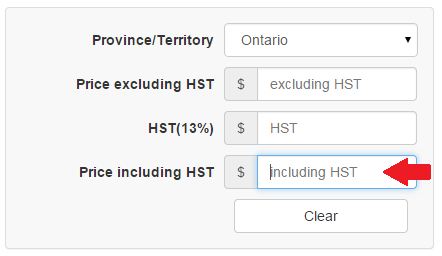
3.Review the calculated price before HST, total HST, federal portion and provincial portion.
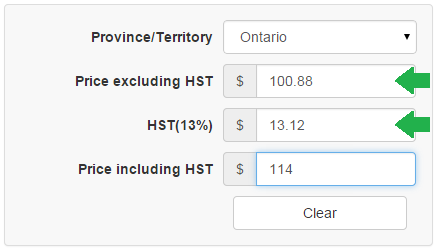
The results update automatically when you enter or change an amount.
That’s it!
Reverse HST formula
To find the price before HST from a tax-inclusive total:
Price before HST = Price including HST ÷ (1 + HST rate)
Use the following divisors for current HST rates:
- Ontario: divide by 1.13
- Nova Scotia: divide by 1.14
- New Brunswick, Newfoundland and Labrador, and Prince Edward Island: divide by 1.15
Then calculate the included HST:
HST included = Price including HST − Price before HST
For example, for a $113 total in Ontario:
- Price before HST: $113 ÷ 1.13 = $100.00
- HST included: $113 − $100 = $13.00
Data source: Canada Revenue Agency.
On the right sidebar there is list of calculators for all Canadian provinces where HST is introduced.
WHERE CAN WE FIND THE OLD CALCULATION FOR THAT SPLITS THE HST AND RITC.. WHERE DID IT GO..
Hi Julie,
we updated our calculators and added back HST split.
Do not like this version at all. The older version was simpler.
What do you mean simpler? We removed one radio button, so now you can just enter number and get result instantly.
Do you like more this calculator?
https://web.archive.org/web/20160423002506/http://hst.calculatorscanada.ca
i love this website thanks
why did i only get 26.08 for my hst
I needed to know what 5% HST( for books in NL) was included in my total statement, but there was nothing to show that amount.
does L.C.B.O. charge HST on bottle deposit?
You need to update Nova Scotia. The HST is now 14%
Hello,
If you could update Nova Scotia to 14% that would be great!
Your site is my go-to site, and going back to my calculator isn’t going to be fun, haha.